Data Tab — Maps & Config
The Data tab lets you save and restore both app configuration and SLAM maps between sessions.
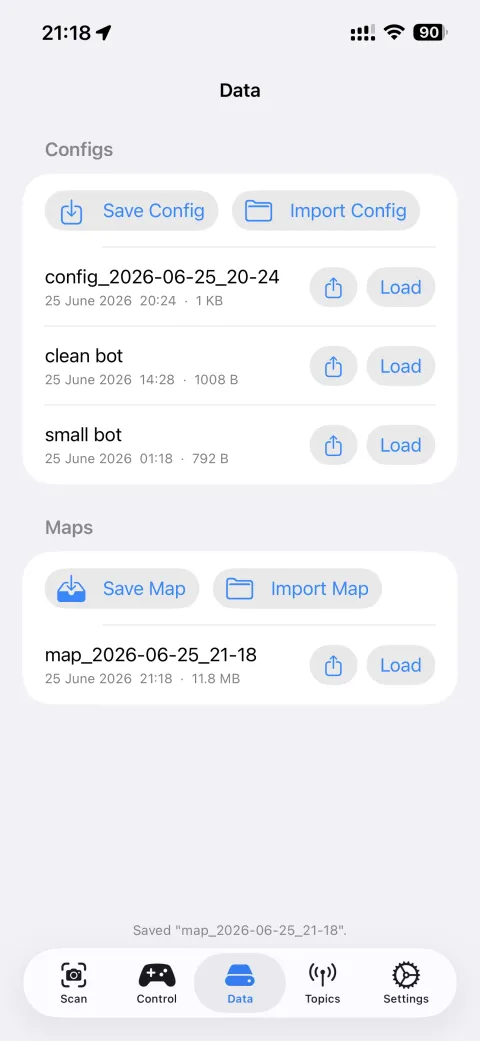
Configuration
| Action | What it does |
|---|---|
| Save Config | Exports current Settings (Zenoh mode, topic rates, robot dimensions) to .json |
| Import Config | Loads a previously saved config |
Maps
| Action | What it does |
|---|---|
| Save Map | Saves the current RTAB-Map database (.db) to local storage |
| Import Map | Loads a saved map; robot will attempt to localise itself in it on next scan start |
SLAM map loading limitation
A saved map only contains what SLAM has seen before. When you load a map and start a new session, SLAM tries to match the current camera view against that map to figure out where the robot is.
If the robot starts in a position or area it has never visited, SLAM cannot find a match and will begin building a new map on top of the old one — producing a corrupted result (walls in wrong places, duplicate rooms, drifting pose).
To reliably reload a map:
- Start the robot in the same approximate position it was in when the map was saved
- Make sure the environment hasn't changed significantly (moved furniture, different lighting)
- Watch the Scan tab — if Tracking stays Limited for more than 30 s, the map failed to localise. Stop, reposition, and try again, or discard and remap from scratch.
Tip
For repeatable map reuse, always start the robot in the same corner or reference point. A physical marker (tape on the floor) helps.
→ Advance app configs — a detail on SLAM parameters
→ App Stages & Lifecycle — full session state overview
→ Troubleshooting — SLAM tracking issues