iblowy — Another DIY Vacuum Robot
Personal experiment
This started as my own experiment — I was curious whether a BLDC motor salvaged from a drone could generate enough suction to actually clean a floor. So far, it kind of works! 😄 But drone motors spinning at full speed are loud, fragile, and not designed for this. For anyone building this seriously, I'd recommend a Handheld Vacuum Cleaner Kit (the kind with a small brushless motor + nozzle already assembled, ~$35–55 on AliExpress) — much safer, quieter, and easier to mount. But again, I’m playing cheap and hope that people are going to download this app so I can make a more premium robot...
Turn your mapping robot into an autonomous vacuum cleaner. This demo adds a suction fan to the base build and unlocks Explore and Clean modes in iROSLink.
Prerequisite
Complete Build & Configure first. This page covers only the additions.
3D printed parts & BOM
All parts for this robot can be printed without supports — nozzle, shroud, dustbox, and frame. STL files, source CAD (Fusion 360 .f3d + .step), and print settings are in the iblowy GitHub repo. Full parts list with prices and links: BOM.md.
Additional wiring
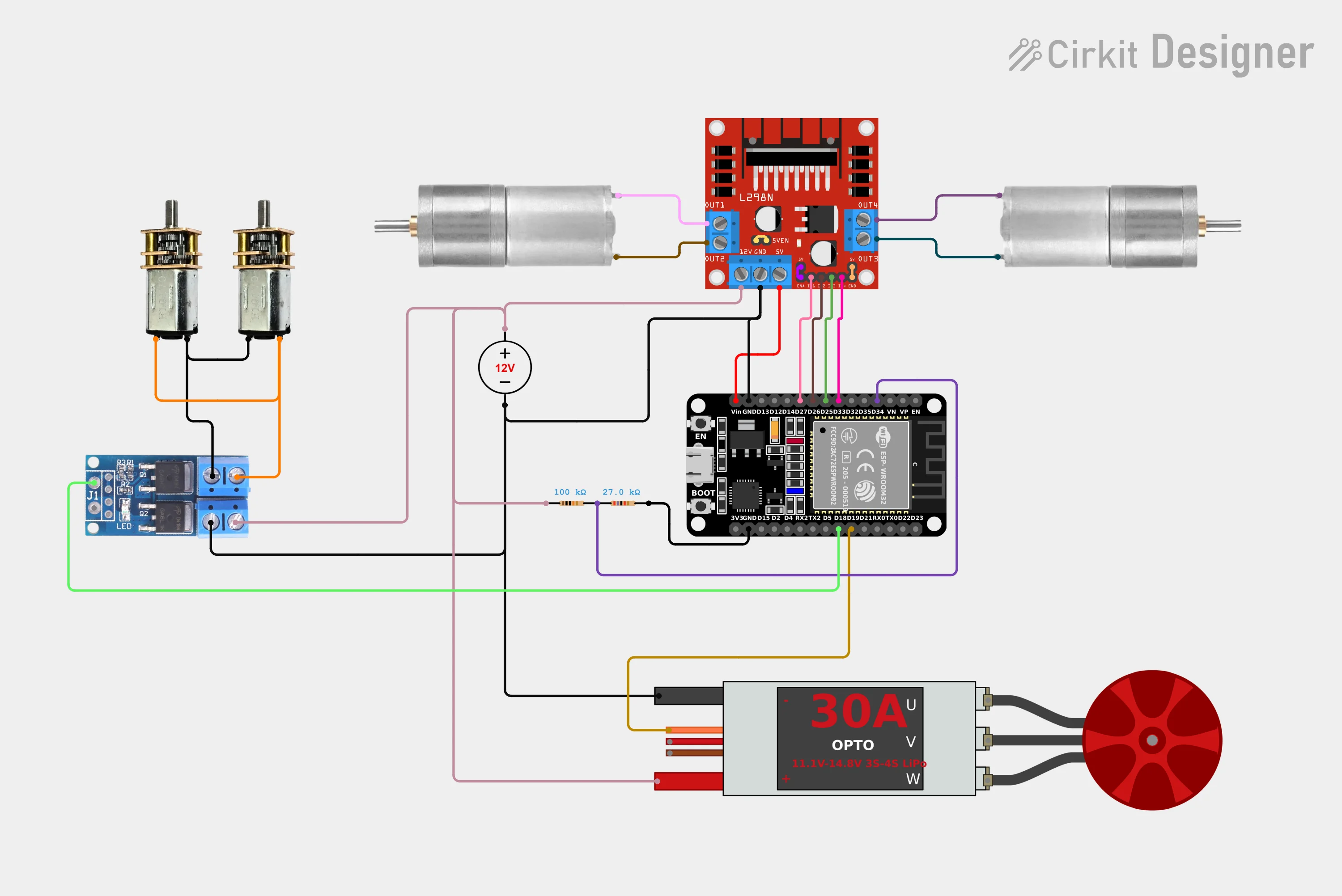
Connect the fan ESC signal wire to GPIO 19 on the ESP32. The ESC receives a standard 50 Hz PWM signal (1–2 ms pulse width).
| Signal | ESP32 GPIO |
|---|---|
| Fan ESC signal | 19 |
| Driving signal / Brush control (HIGH while moving) | 18 |
| Battery ADC (optional) | 34 |
Brush control
GPIO 18 drives the side-brush motor(s) directly — brushes spin whenever the robot is moving, no separate control needed.
Battery ADC
GPIO 34 is input-only. If you wire battery voltage monitoring, use a voltage divider to bring the voltage into the 0–3.3 V range the ADC expects.
Circuit diagram
Test the fan
Press the onboard BOOT button (GPIO 0) to toggle the fan between 50% throttle and off — useful for verifying ESC wiring without a ROS2 connection.
What you can do
Explore
The robot performs a 360° spin to orient itself, then autonomously navigates to unmapped frontier cells one by one — building a complete map of the space without any manual driving.
When the entire reachable area is mapped (or the time limit is reached), the robot returns to its starting position.
→ Explore Mode — full setup and what to expect
Clean
The robot drives a boustrophedon (back-and-forth zigzag) path across all mapped free space, running the suction fan throughout. Requires a completed map — run Explore first, or drive manually to map the area.
→ Clean Mode — full setup, fan speed, and troubleshooting